





The usual Toast, but with steroids.
Add this in your root build.gradle file (not your module build.gradle file):
allprojects {
	repositories {
		...
		maven { url "https://jitpack.io" }
	}
}Add this to your module's build.gradle file (make sure the version matches the JitPack badge above):
dependencies {
	...
	implementation 'com.github.GrenderG:Toasty:1.5.2'
}This step is optional, but if you want you can configure some Toasty parameters. Place this anywhere in your app:
Toasty.Config.getInstance()
    .tintIcon(boolean tintIcon) // optional (apply textColor also to the icon)
    .setToastTypeface(@NonNull Typeface typeface) // optional
    .setTextSize(int sizeInSp) // optional
    .allowQueue(boolean allowQueue) // optional (prevents several Toastys from queuing)
    .setGravity(int gravity, int xOffset, int yOffset) // optional (set toast gravity, offsets are optional)
    .supportDarkTheme(boolean supportDarkTheme) // optional (whether to support dark theme or not)
    .setRTL(boolean isRTL) // optional (icon is on the right)
    .apply(); // required
You can reset the configuration by using reset() method:
Toasty.Config.reset();Each method always returns a Toast object, so you can customize the Toast much more. DON'T FORGET THE show() METHOD!
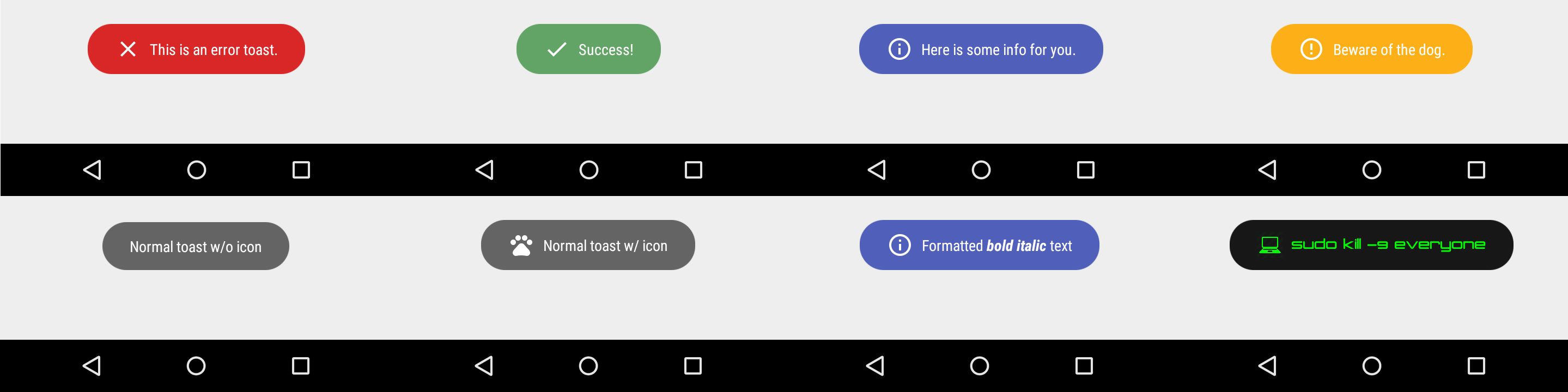
To display an error Toast:
Toasty.error(yourContext, "This is an error toast.", Toast.LENGTH_SHORT, true).show();To display a success Toast:
Toasty.success(yourContext, "Success!", Toast.LENGTH_SHORT, true).show();To display an info Toast:
Toasty.info(yourContext, "Here is some info for you.", Toast.LENGTH_SHORT, true).show();To display a warning Toast:
Toasty.warning(yourContext, "Beware of the dog.", Toast.LENGTH_SHORT, true).show();To display the usual Toast:
Toasty.normal(yourContext, "Normal toast w/o icon").show();To display the usual Toast with icon:
Toasty.normal(yourContext, "Normal toast w/ icon", yourIconDrawable).show();You can also create your custom Toasts with the custom() method:
Toasty.custom(yourContext, "I'm a custom Toast", yourIconDrawable, tintColor, duration, withIcon,
shouldTint).show();You can pass formatted text to Toasty!
There are variants of each method, feel free to explore this library.
Please click the image below to enlarge.
You may now use this library with React Native via this module.
Want to be here? Open an issue or make a pull request.


