
Community firmware, local printer control and reproducible build tools for the ELEGOO Centauri Carbon 2, maintained by Neme77.


| 🖨️ Complete firmware · V4.4.2 | 🔄 CC2 Control · 1.2.22 |
|---|---|
| Download signed firmware · Release notes and checksums | Download Windows / macOS / Linux package · Release notes and checksums |
| Complete installation with CC2 Control 1.2.21 and the webcam fix already included. No extra reboot after firmware installation. | For community firmware V4.4/V4.4.1/V4.4.2. Includes the camera stability and recovery fixes. |
Optional experiment · Canvas pull-back R4: Download the Windows / Linux / macOS kit. Extends the configurable limit up to 1000 mm on qualified V4.4.1/V4.4.2 with Control 1.2.21/1.2.22. By Noahwhite2014. Instructions. Remove the component and reboot before app/firmware updates.
Updating from the CC2 Control panel? Download the signed .cc2update file and select it in Settings → Updates. For app-only updates, reboot while idle only on first activation of the camera fix; it is already active for users coming from 1.2.19. Complete V4.4.2 installation needs no additional reboot.
Italiano · Documentation · Downloads · Screenshots
Independent community project, not affiliated with or supported by ELEGOO. This project targets the Centauri Carbon 2, not the first Centauri Carbon.

| What you need | English | Italiano |
|---|---|---|
| Install the complete community firmware | First installation | Prima installazione |
| Update an existing CC2 Control installation | Application updates | Aggiornamenti dell’app |
| Connect OrcaSlicer and synchronize Canvas slots | OrcaSlicer setup | Configurazione OrcaSlicer |
Download files from GitHub Releases and follow the matching guide and release notes. Complete firmware, the CC2 Control application and the source builder are different downloads: the builder ZIP is not an installable printer update. Check the supplied SHA-256 checksums before installation.
The current qualified firmware family is V4.4/V4.4.1/V4.4.2, based on ELEGOO 02.01.01.07. Its application updates are not interchangeable with stock firmware, older community firmware or experimental builds.
Open http://PRINTER-IP:8081 on your local network. OrcaSlicer also needs
:8081 after the printer IP. App installation requires the printer’s LAN
access code, which is different from the SSH password; checking for updates
does not. Installation always requires confirmation. Camera-component updates
require a full printer reboot as described in their release notes.
- Local dashboard, live video, temperatures, fans, print speed and flow controls.
- Internal/USB files, model previews and interactive object exclusion.
- Canvas slot states, material settings, auto refill and OrcaSlicer filament sync.
- Bed leveling, saved plate/nozzle meshes and optional spool inventory/tracking.
- Backup and selective restore, diagnostics, protected Console and signed app updates.
- Multiple interface languages, themes and desktop/mobile layouts.
See the application guide and screenshot gallery. Experimental features remain opt-in and require their own validation.
Small wording mistake in 1.2.22: the Updates page still says experimental features are “selected separately below”. They are actually under Settings → Integrations. Sorry for the misleading wording; the features work normally. We will correct the text in the next update.
- External spool, including printers bought without the Canvas Combo: native Load / Unload when Canvas is confirmed absent, plus Brand → Type → Subcategory → Colour editing. Canvas shares the stock material catalog and 24-colour palette (#233). External feeding with Canvas connected is not enabled by this update.
- Dashboard: pezso92’s paused-camera artwork, speed/flow sliders alongside numeric Apply/Reset controls, aligned panels and Keep active in the camera header (#223).
- Control: compact machine actions, live Z offset above print tuning and aligned calibration panels (#226).
- Spoolman: optional server sync by tharje (#208), independently enabled in Integrations; configuration and local tracking are kept when disabled (#227).
- LAN code: optional verified browser-local remembering, masked prefilled fields and explicit Forget (#225).
- Print completion: nonblocking filename/duration notice, Confirm and Print again; idle progress clears without homing (#219).
- Spool history: bounded scrolling with All / Consumption-only filters, suggested by DamiBFryta (#220).
- Experimental integrations: Canvas UDS, Quiet and timed bed heating grouped in Settings → Integrations, independently enabled with aligned actions (#223/#232).
- Filament drying experiment: finite timed bed heating, explicit stop and zero-target confirmation (#198/#218/#230); requested by romeopuch, native help-check issue diagnosed by Noahwhite2014, documentation clarified by pezso92 (#235).
- Updates and packaging: supported-version notices corrected in all nine languages (#222); unused firmware web overlay removed (#229). Cumulative webcam fix, preferences, mesh libraries and backups retained.
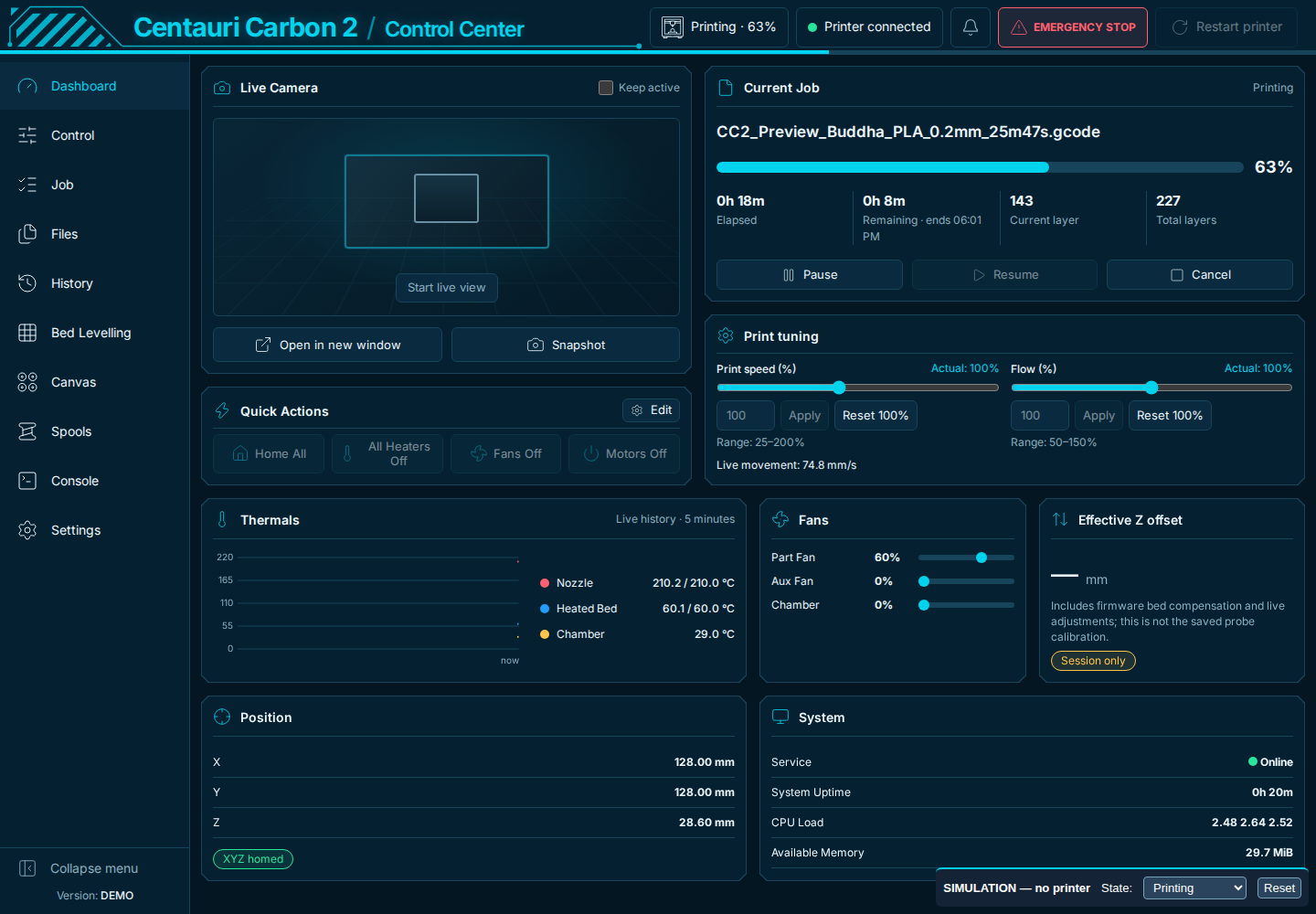
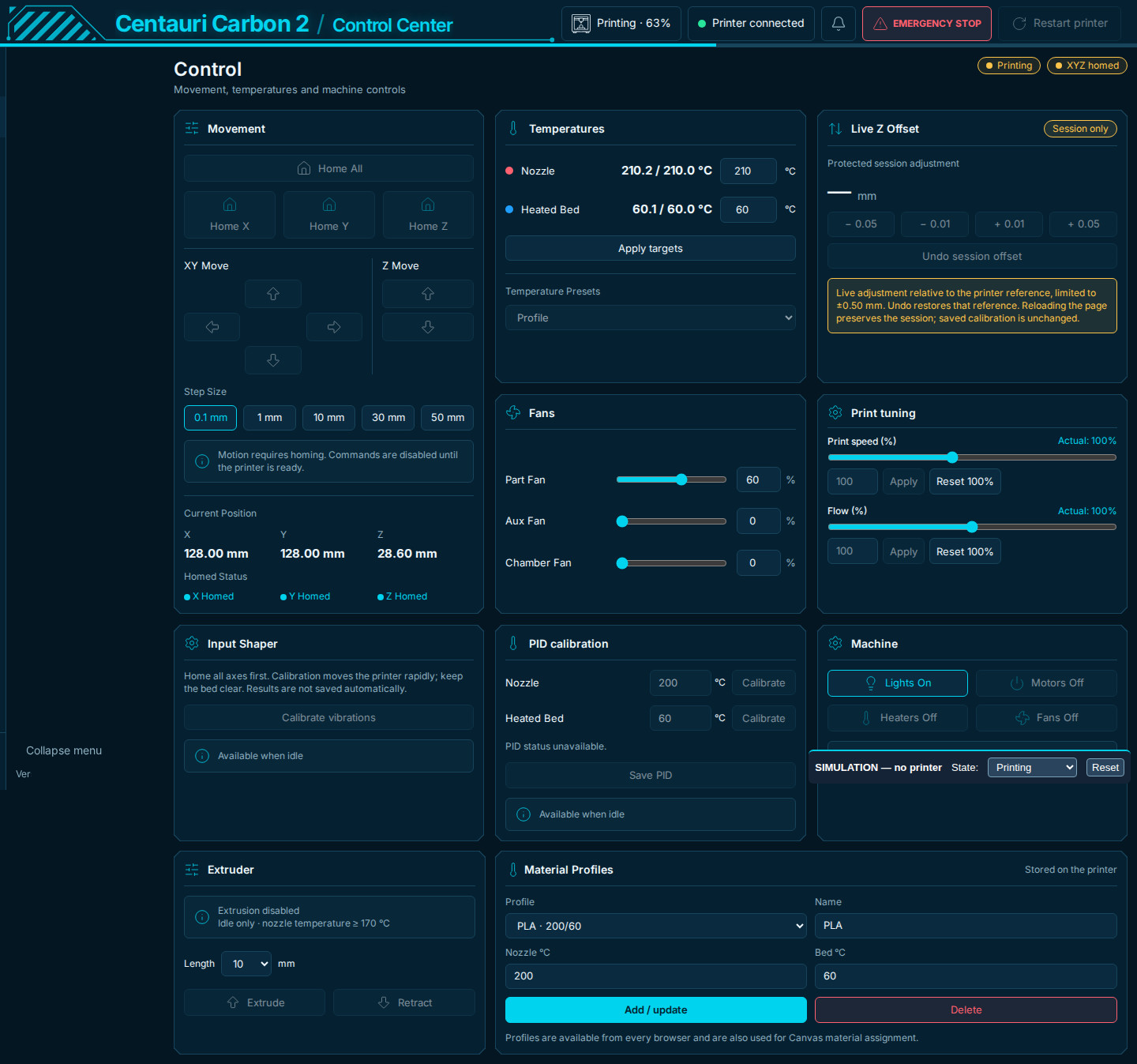
Separate experimental Windows / Linux / macOS kit, by Noahwhite2014 (#228). Qualified V4.4.1/V4.4.2 only, with Control 1.2.21/1.2.22. Raises the accepted range up to 1000 mm without choosing a distance or sending movement; suitability depends on the filament path. Remove it and reboot before app/firmware updates. Never installed by the automatic updater. Instructions.
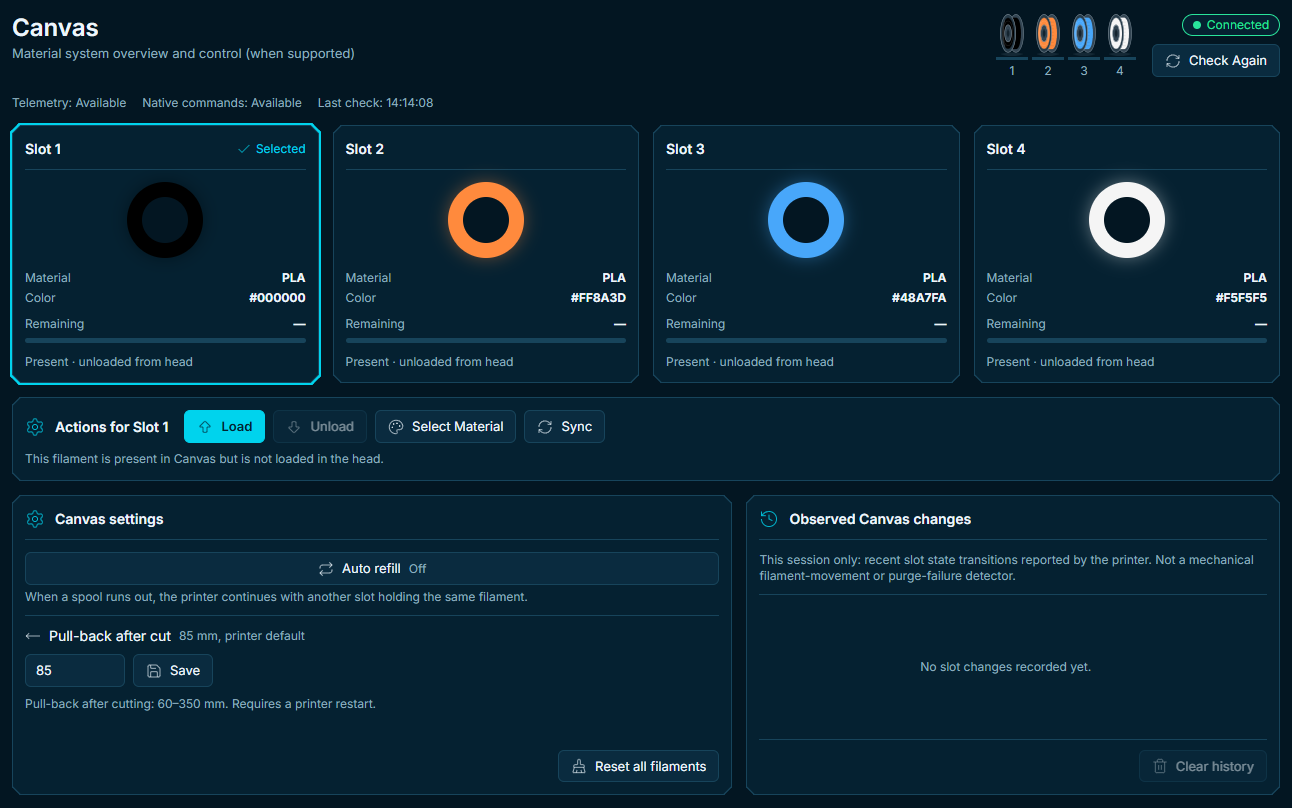
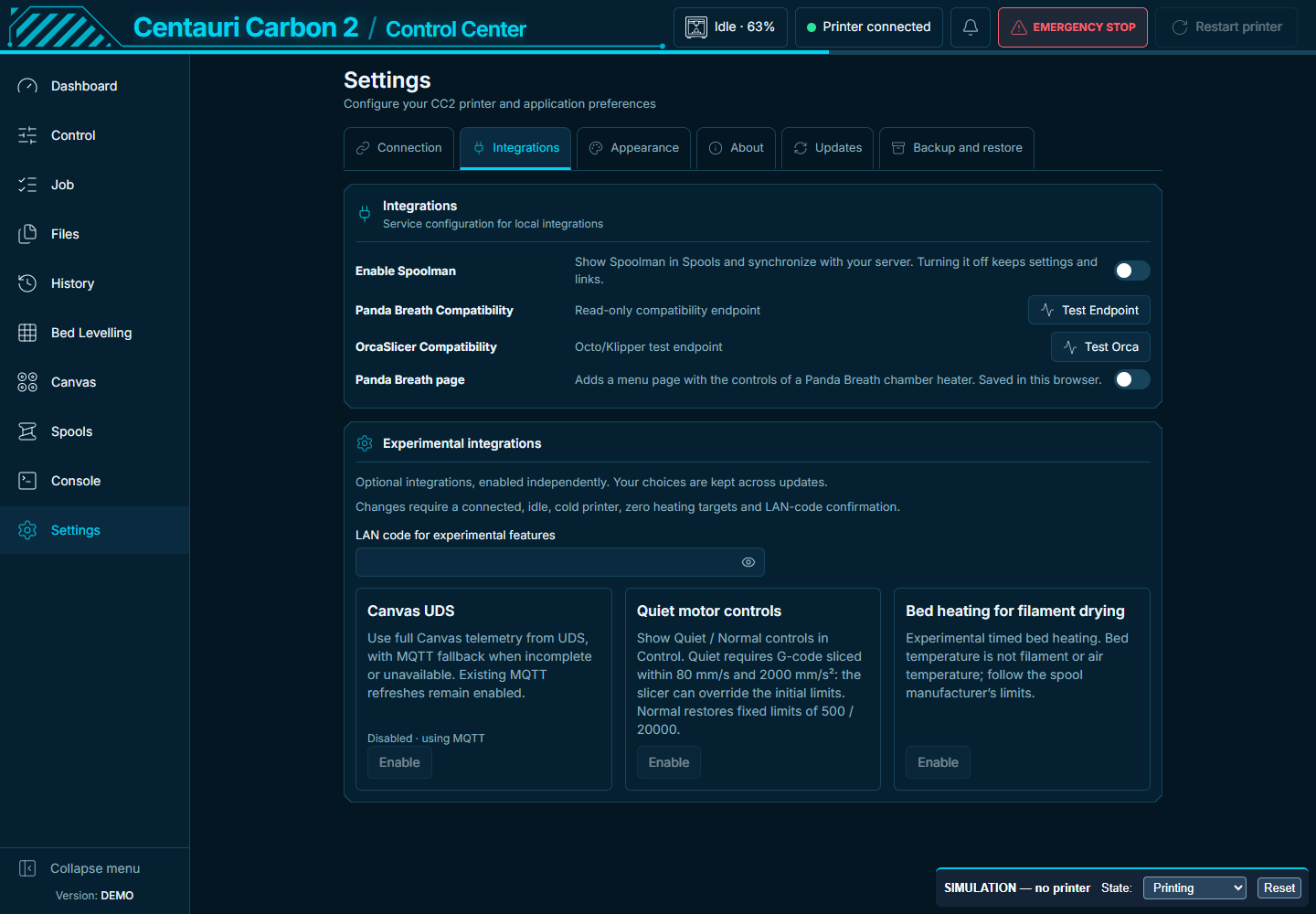
Canvas layout inspired by Surfoo; original Quiet feature by BorjaLL. Experiments retain saved choices. Previews use simulated data. Full V4.4.2 firmware and builder still include Control 1.2.21; install this app update for the new features.
Release notes / Note complete, validation, checksums and credits.
Documentation index · Report a problem · Contributing · Build guide · Source and provenance
Version history belongs in the CHANGELOG and release notes. Installation details and compatibility requirements are maintained in the guides linked above.
Thanks to Surfoo, beanbo, efiten, Skcycos, pezso92, asiersan, Noahwhite2014, tharje, Nick Plateringen-Paul, and every contributor, translator and tester. Special thanks to DamiBFryta, our ultimate beta tester. Full credits and original contributions.
AI-assisted work is reviewed and validated. Architecture decisions, printer-side testing and release approval remain with the maintainer and community testers.
Project code is GPL-3.0-only where contributors have the right to license it. Vendor firmware and third-party components retain their own terms. See LICENSE and NOTICE.md.
