


An interactive cheatsheet tool for the command-line.
Note
Maintenance mode. navi still gets bug fixes, but no new features are planned. For a more modern alternative, check out ezlo.
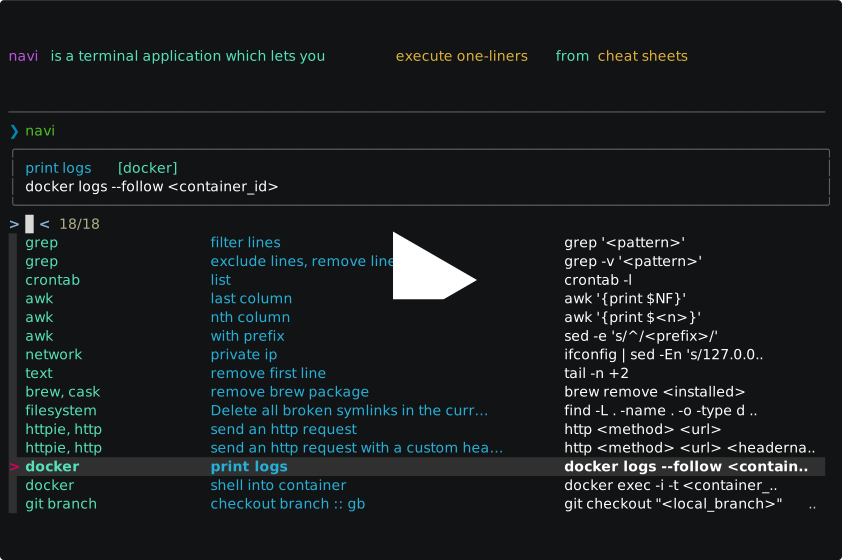
navi allows you to browse through cheatsheets (that you may write yourself or download from maintainers) and execute commands. Suggested values for arguments are dynamically displayed in a list.
- it will spare you from knowing CLIs by heart
- it will spare you from copy-pasting output from intermediate commands
- it will make you type less
- it will teach you new one-liners
It uses fzf or skim under the hood and it can be either used as a command or as a shell widget (à la Ctrl-R).
The recommended way to install navi is by running:
brew install naviNote
For more details on how to install Navi, see docs/installation
navi can be installed with the following package managers:

There are multiple ways to use navi:
- by typing
naviin the terminal- pros: you have access to all possible subcommands and flags
- as a shell widget for the terminal
- pros: the shell history is correctly populated (i.e. with the actual command you ran instead of
navi) and you can edit the command as you wish before executing it
- pros: the shell history is correctly populated (i.e. with the actual command you ran instead of
- as a Tmux widget
- pros: you can use your cheatsheets in any command-line app even in SSH sessions
- as aliases
- as a shell scripting tool
In particular, check these instructions if you want to replicate what's shown in the demo above.
Running navi for the first time will help you download and manage cheatsheets. By default, they are stored at ~/.local/share/navi/cheats/.
You can also:
- browse through featured cheatsheets
- import cheatsheets from git repositories
- write your own cheatsheets (and share them, if you want)
- use cheatsheets from other tools, such as tldr and cheat.sh
- auto-update repositories
- auto-export cheatsheets from your TiddlyWiki notes using a TiddlyWiki plugin
Cheatsheets are described in .cheat files that look like this:
% git, code

# Change branch
git checkout <branch>

$ branch: git branch | awk '{print $NF}'
The full syntax and examples can be found here.
You can:
- setup your own config file
- set custom paths for your config file and cheat sheets
- change colors
- resize columns
- change how search is performed
Please run the following command to read more about all possible options:
navi --helpIn addition, please check the /docs folder or the website.