









Thanks to my supporters and everyone who purchased LosslessCut!
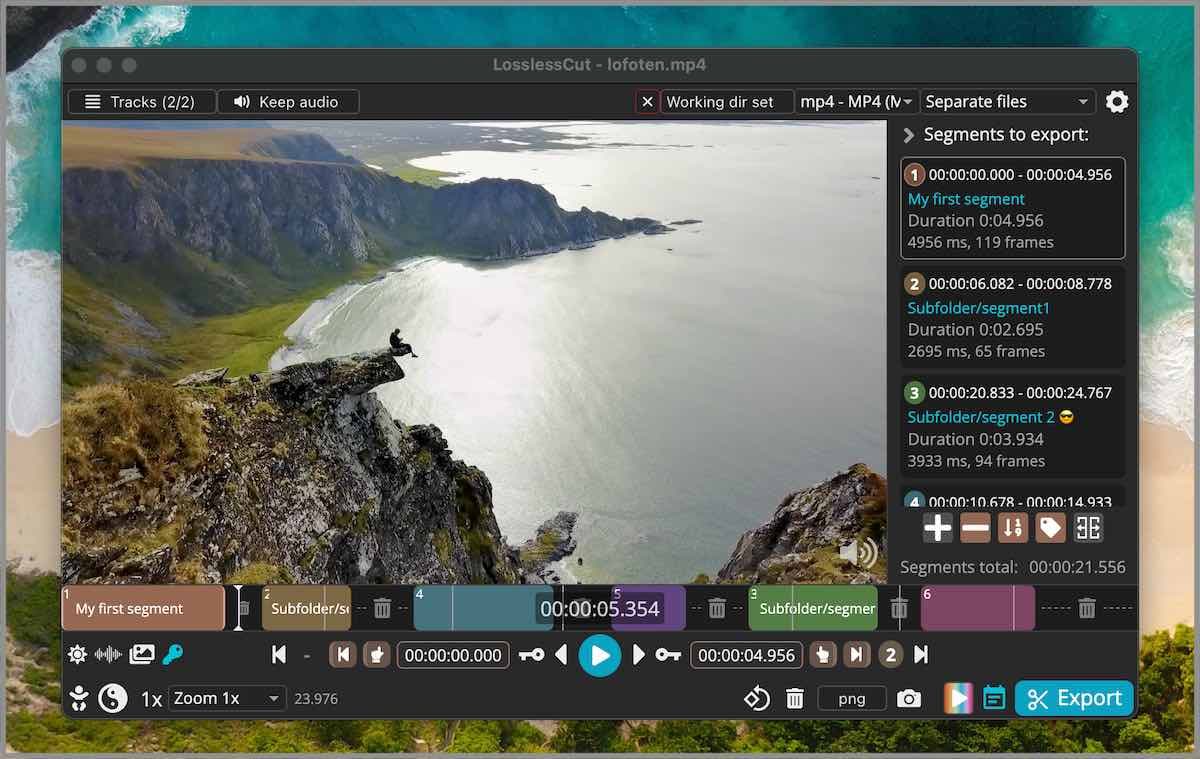
LosslessCut aims to be the ultimate cross platform FFmpeg GUI for extremely fast and lossless operations on video, audio, subtitle and other related media files. The main feature is lossless trimming and cutting of video and audio files, which is great for saving space by rough-cutting your large video files taken from a video camera, GoPro, drone, etc. It lets you quickly extract the good parts from your videos and discard many gigabytes of data without doing a slow re-encode and thereby losing quality. There are also many more use cases. Everything is extremely fast because it does an almost direct data copy, fueled by the awesome FFmpeg which does all the grunt work.
- Features
- Download
- Supported formats
- Documentation, usage & getting started
- Video demos
- Featured
- Attributions
- Cut and trim video and audio losslessly, in seconds
- Merge cut segments, or whole files with identical codecs, losslessly
- Add, remove, replace or extract tracks: audio, subtitles and more
- Change the format (remux), for example from MKV to MP4, without re-encoding
- Segments, markers and tags, with import/export of chapters, CSV, EDL and more
- Detect scenes, black frames and silence, and split by them
- Edit metadata and rotation, and create chapters
- Opens almost any format, even ones your player can't play
- Snapshots and frame export, keyboard shortcuts, a CLI and an HTTP API
All features and example use cases →
See also the Recipe cookbook.
If you want to support my continued work on LosslessCut, and you want the advantage of a secure and simple installation process with automatic, stable updates, consider getting it from your favorite store:


For Linux I publish to the Snap Store:

If you prefer to download the executables manually, this will of course always be free (see also supported operating systems):
- macOS: Intel / Apple Silicon DMG (note that PKG does not work)
- Windows: 7zip (Windows 7, 8 and 8.1 is no longer supported after v3.50.0)
- Linux: x64 tar.bz2 / x64 AppImage / arm64 tar.bz2 / Raspberry Pi armv7l (armv7l doesn't include FFmpeg)
- More releases - Note that APPX (Windows) and PKG (macOS) do not work
- Latest nightly builds 🧪
Note that the above are the only official downloads. There are also unofficial releases like Flathub (not maintained by me). Difference between App Stores and GitHub download? Please see FAQ.

LosslessCut is maintained by me alone and will always remain free and open source. If it's useful to you, consider supporting my work. Alternatively donate to the FFmpeg team because they are doing the world a huge favor.
LosslessCut uses the Chromium browser's HTML5 video player, and not all formats/codecs are natively supported. Generally, the following file formats work: MP4, MOV, WebM, Matroska, OGG and WAV. Audio codecs: FLAC, MP3, Opus, PCM, Vorbis and AAC. Video codecs: H264, AV1, Theora, VP8, VP9 and H265 (with hardware decoder). Learn the difference between a codec and a format. Files with other codecs and formats are played through FFmpeg instead (FFmpeg-assisted playback), automatically when LosslessCut knows they're unsupported, or from File → Convert to supported format. The export is still done from the original file, so it's still lossless. This means you can open almost any file that FFmpeg can decode.
- Official website: LosslessCut.app
- Getting started
- FAQ
- Usage documentation
- Troubleshooting and known issues and limitations
- Contributing
- Common features
- How to add a thumbnail / cover art to an MP4
- How to add multi-language audio to a video
- Your video here?
- Console newsletter
- Hacker News 2024 2022 2020-10 2020-01 2016
- Wikipedia
- Your link here?
- theo (YouTube) 1 2
- App icon made by Dimi Kazak from www.flaticon.com is licensed by CC 3.0 BY.
- Lottie animation by Chris Gannon.
- Thanks to Adi Abinun and @abdul-alhasany for UI work.
- Thanks to translators who helped translate the app. You can too!
- Thanks to everyone for supporting my open source work 🙌
Made with ❤️ in 🇳🇴
Follow me on GitHub, YouTube, IG, Twitter for more awesome content!