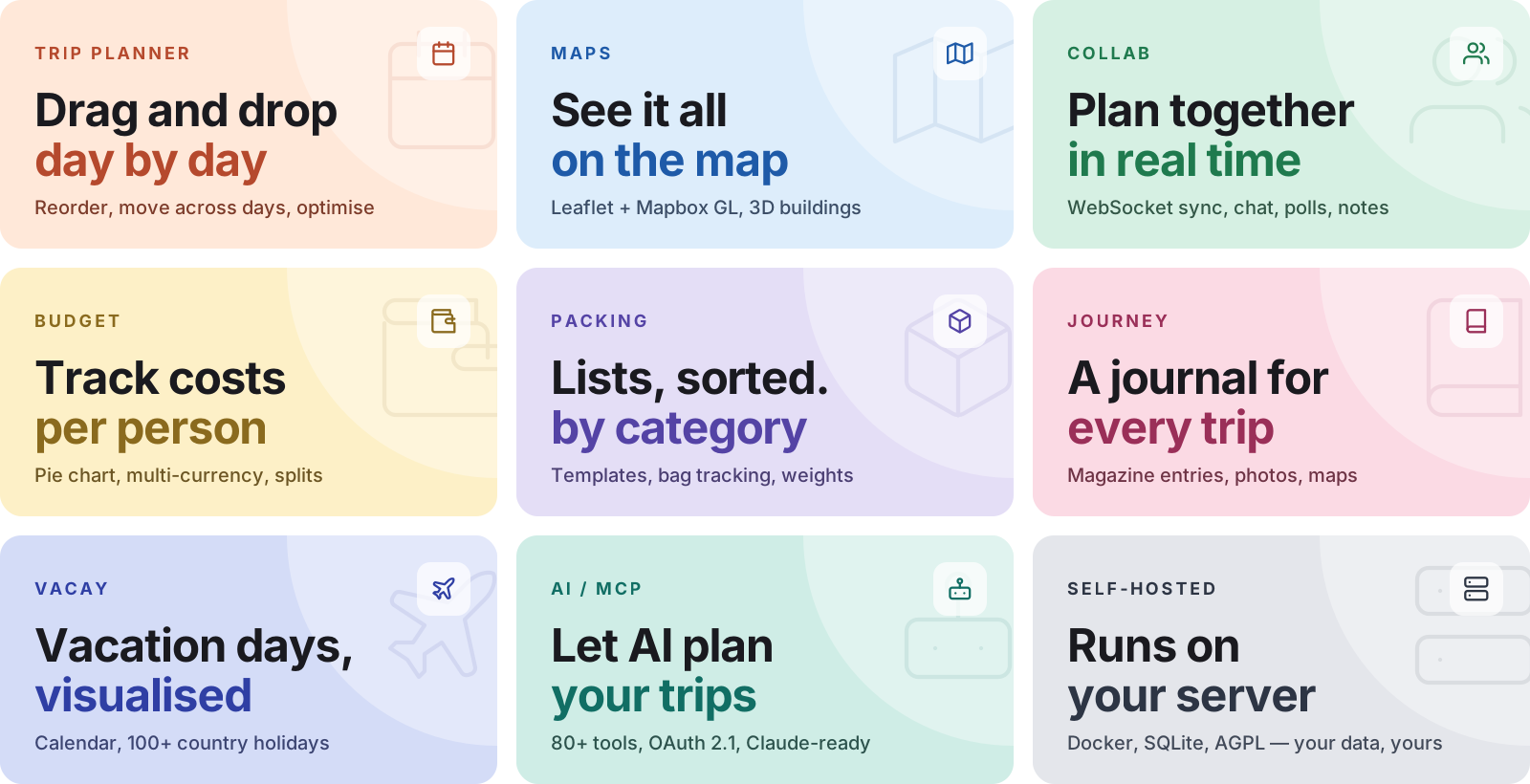
A self-hosted travel/trip planner with real-time collaboration, interactive maps, PWA support, SSO, budgets, packing lists, and more. (This description comes from the repository itself.)
On boards 2d · +21 stars in 30d · ~+11/dayOn a 2-day streak
Project statusLicense: AGPL-3.0Last push: October 25Open issues: 3
Collected since 2026-10-25; unknown = not yet harvested
[](https://git.vaiox.xyz/en/repo/liketrek/TREK)
<a href="https://git.vaiox.xyz/en/repo/liketrek/TREK"><img src="https://git.vaiox.xyz/api/badge/liketrek/TREK.svg" alt="Put your badge on the README" height="20"></a>
README
A self-hosted, real-time collaborative travel planner — with maps, budgets, packing lists, a journal, and AI built in.
What you get
See all features
Most of what follows is an addon an admin switches on or off. Lists, Costs, Documents, Collab, Tours, Vacay and Atlas ship on; Journey, Collections, MCP, the AI assistant, AI Parsing, Road trip, Dawarich and AirTrail ship off and are marked below.
🧭 Planning
Day plans: drag places, notes and bookings between days with undo, or drop a map marker straight onto a day
Maps: Leaflet, Mapbox GL or MapLibre GL (OpenFreeMap, no token) with clustering, photo markers, route lines and a whole-trip route overview
Places: search the TREK Places index and OpenStreetMap with no key, or Google Places and Amap with one. Descriptions, hours and photos from Wikipedia, Wikidata and Wikimedia Commons, plus a rating and a custom image per place
Explore: nearby places by category for the map view, from the TREK Places index with Overpass as fallback
Routes: auto-sort a day (nearest neighbour then 2-opt, locked stops and hotels stay put), a travel mode per leg over OSRM or Valhalla, then open the day in Google Maps or CoMaps and a place in seven navigation apps
Public transport: door-to-door itineraries over Transitous, or Google where Transitous has no data
Import and export: Google Maps and Naver Maps lists, Google Maps directions links, GPX, KML and KMZ in; GPX and an ICS feed per trip or across all trips out
Weather: 16-day forecast from Open-Meteo, no key, and the archive for dates beyond it
Trip dates: move a trip and its days re-date themselves, with the bookings along or re-anchored. Trips also copy and archive
Road trip (off by default): drives with stops, day windows and arrival times that recompute, route alternatives, hazards and EV charging with range
🥾 Tours
Seven tour types: hike, city walk, run, bike (touring, road, gravel, MTB), paddle (kayak, canoe, SUP), horse ride, and ski and winter (alpine, cross-country, touring, snowshoe, winter hike)
Routing: legs routed over Valhalla with shaping points, hand-drawn legs, route variants, round hikes of a wished length and trip places as stops, all with undo
Hikes: routed within a maximum SAC grade (T1 to T6), the trail grades along the way, and via ferratas on the map
Terrain: elevation profile, ascent and descent, and a 3D terrain map with grade colouring and a flyover, no token needed. Topo, hiking, cycling and satellite bases with sea marks and ski pistes as overlays
Multi-day tours: one route cut into stages and spread across the trip's days
Along the way: viewpoints, huts, water, food and more within a corridor of the route, inserted as a stop with the detour it adds
Ski, paddle and city walks: a piste router by difficulty and lift type; a water router with portages, locks and a wind forecast; city walks with stays, opening hours and transit between stops
Plan against reality: link a recorded GPX to a planned day and compare distance, ascent and time. Import trails from a wanderer instance, save tours to a collection and take them into another trip
🧳 Bookings and money
Reservations: 18 booking types with status, confirmation code, travellers and attached files
Flights and trains: several legs with stopovers and endpoint timezones, against 4,045 bundled airports so local times resolve without a key
Accommodation: a stay spans a range of nights with a check-in window
Booking import: EML, PDF, PKPass, HTML, TXT and photos of confirmations, through KItinerary or an AI model, with a review step before anything is saved. Prices become linked costs
AirTrail (off by default): import flights from a self-hosted AirTrail instance and keep them in sync
Costs: split in integer cents with equal or custom shares, several payers, settle-up suggestions, a per-person summary, a settlement log and CSV export. A receipt photo can fill in an expense
Currencies: one per expense with the rate frozen at entry, from Frankfurter with no key
Packing lists and to-dos: categories, templates, assignees and visibility tiers; bags with weights as an admin switch; to-dos with due dates, priorities and reminders
Files: attach to a trip, place, day or booking, 50 MB each and 500 MB for video, with trash and restore
PDF export: cover, place photos, day notes, bookings and costs, with an optional page break per day
👥 Collaboration
Real-time sync (WebSocket): edits land live for everyone who has the trip open
Members: add by email or username, hand over ownership, or add guests who have no login at all
Permissions: an admin maps each of 17 trip actions to admin, trip owner, trip member or everybody
Invites: one reusable link per trip with an optional expiry, and admin signup invites that drop a new account straight into a trip
Public share: a read-only trip page without an account, with switches for map, bookings, packing, costs and chat
Collab: group chat with replies, reactions and link previews, shared notes, links, polls and a What's Next list, each one its own switch
Notifications: an inbox grouped by day with answers right from the notification, and a per-user matrix of events against in-app, email, webhook, ntfy, Web Push and plugin channels
📔 Journey and TREK Studio
Journey (off by default): dated entries with story, mood, weather and tags, photos and video from uploads, Immich or Synology Photos, map views, co-authors, drafts and a public share link
Linked journal: a trip can show one journal as its own, with the members picked on the trip as viewers or editors
Recorded days (with Dawarich): keep a day's recorded route and turn its stays into entries
TREK Studio: turn a journal into a printable photo book. 34 print-licensed typefaces, 17 themes, 108 designed pages in twelve styles, 160 recolourable stickers, text effects, layers and a Travel tab with route maps, country stamps and trip figures
Auto layout: lays the whole book on the designed pages in the style of its theme, every photo in a frame, or rebuilds one spread
Print and share: PDF export as pages or spreads with crop marks, several people editing at once, and design files to move a spread into another book
🗺️ Atlas, Vacay and Collections
Atlas: countries and regions visited on geoBoundaries outlines, a bucket list, travel stats, and a tour activities tab with planned against recorded totals
Vacay: leave calendar with half days, public holidays from date.nager.at, school holidays for 16 European countries, company holidays, carry-over between years, and joint or read-only sharing
Collections (off by default): a place library outside any trip with lists, labels, ratings, a status per place, cover images, GPX and file export, copy into a trip, and sharing by invite
Dawarich (off by default): link a Dawarich instance for recorded tracks, suggested stays and countries for the Atlas
🤖 AI assistant and MCP
AI assistant (off by default): a chat that plans with you in a trip, across all your trips, in a journal and in Studio, and works with tours, costs, bookings, packing, Vacay and the Atlas
Your own model: an API key for Anthropic, OpenAI, Gemini or OpenRouter, a ChatGPT plan, or any OpenAI-compatible endpoint, set for the instance or per user
You stay in charge: reads run at once, every change waits as a card to apply or discard and can be undone for 15 minutes. Nothing leaves before you agree to the provider, and a file's text only with your consent
Attachments: drop a booking confirmation, a GPX file or a photo into the chat, and the assistant offers what to do with it
MCP server (off by default): OAuth 2.1 with mandatory PKCE and dynamic client registration, 410 tools, 30 resources and 4 prompts, 35 scopes in 17 groups ticked on the consent screen, and every call in the audit log
Addon-aware: twelve addon gates decide which tools a session sees, and flipping one re-registers live sessions
🧩 Plugins
Third-party plugins: install from the TREK registry or sideload a zip, with their own pages under /plugins/<id>
Sandboxed: one child process per plugin, 66 grantable permissions, an admin-edited outbound host allowlist, memory and call caps
Trust: registry downloads are pinned by sha256 and checked against the author's minisign key, a sideloaded zip is marked unverified, and TREK_PLUGINS_ENABLED=false turns the whole system off
Extension points: map layers, place details, day schedules, PDF sections, Atlas layers, journal rows, trip warnings, search and photo providers, route profiles, notification channels and MCP tools
SDK: trek-plugin-sdk with a CLI to create, validate, run against real data, sign and publish
📱 Mobile and offline
Installable: iOS and Android straight from the browser, no App Store, standalone with a themed status bar
Phone layouts: their own screens for every part of the app, with a bottom bar and dashboard widgets the user orders
Offline reads: the app shell is precached and trips, places, tours, files and nearby places live in a per-user IndexedDB store, so a trip opens with no network
Offline writes: changes queue and replay with an X-Idempotency-Key, and a stale edit waits for a keep-mine or keep-theirs choice
Offline maps: raster and vector tiles of a trip downloaded ahead, and a switch that takes the whole app offline on purpose
⚙️ Admin, accounts and security
Sign-in: password, OIDC and passkeys each switch on and off on their own, OIDC_ONLY leaves SSO as the only way in, and an OIDC claim can grant admin
SSO and 2FA: one OIDC provider by discovery with PKCE (Authentik, Keycloak, Google and the like), TOTP with backup codes that an admin can require, and passkeys that count as the second factor
Sessions: every sign-in is a session you can see and end, one by one or all others at once
Hardening: rate limits on sign-in, reset and 2FA, a password policy, secrets encrypted at rest and masked on read, and an SSRF guard on every URL you configure
Admin panel: users and the permission matrix, defaults for new users, categories and templates, addons, plugins, storage, notifications, MCP tokens, backups, audit log and releases
Backups and storage: scheduled backups with retention that restore their own secrets, and local or S3-compatible storage per content category with replicas
Appearance: light, dark or follow the OS, seven colour schemes plus a custom accent, transparency, density, reduced motion and text size
27 languages: en, de, es, fr, it, nl, hu, ru, zh, zh-TW, pl, cs, ar (right to left), br, id, tr, ja, ko, uk, gr, sv, vi, ca, az, et, sk, th
Help center: a ? in the top bar with 381 step-by-step guides with screenshots, searched together with the wiki that ships in the image
AI usage
We use LLM-assisted coding tools across parts of this codebase. Nothing ships that a
maintainer has not read and understood: every change goes through a pull request, is
reviewed and tested, and has a human who can answer for it. "The AI wrote that" is not
an answer any of us would accept from ourselves.
Open http://localhost:3000, or http://<server-ip>:3000 from another machine. On first boot TREK seeds an admin account — if you set ADMIN_EMAIL/ADMIN_PASSWORD those are used, otherwise the credentials are printed to the container log (docker logs trek).
COOKIE_SECURE=false is only for trying TREK over plain HTTP: without it the browser drops the session cookie and the login does not stick. Once TREK sits behind HTTPS (see Reverse Proxy), remove it.
Real-time sync via WebSocket (ws). Backend on NestJS 11. State with Zustand. Auth via JWT + OAuth 2.1 + OIDC + Passkeys (WebAuthn) + TOTP MFA. Weather via Open-Meteo (no key required). Maps with Leaflet and Mapbox GL.
Docker Compose (production)
The repository ships a ready-to-use docker-compose.yml
with secure defaults and every option documented inline. Download it, then:
TREK works as a Progressive Web App — no App Store needed.
Open TREK in the browser (HTTPS required)
iOS: Share ▸ Add to Home Screen
Android: Menu ▸ Install app (or Add to Home Screen)
TREK then launches fullscreen with its own icon, just like a native app.
Updating
See Updating — Docker Compose,
Docker run, Helm, Portainer, Unraid and Proxmox, plus the encryption-key note.
Reverse Proxy
For production, put TREK behind a TLS-terminating reverse proxy. TREK uses WebSockets for real-time sync, so the proxy must support WebSocket upgrades on /ws.
If you use the MCP addon, the proxy must also pass the Mcp-Session-Id header through in both directions on /mcp — Nginx and Caddy do this by default, but a proxy that strips it makes every tool call open a new session instead of reusing one. See the Reverse Proxy wiki page for details.
Nginx
server{listen80;server_name trek.yourdomain.com;return301 https://$host$request_uri;}server{listen443ssl http2;server_name trek.yourdomain.com;ssl_certificate /etc/ssl/fullchain.pem;ssl_certificate_key /etc/ssl/privkey.pem; # 500 MB covers backup-restore uploads (capped at 500 MB server-side).client_max_body_size500m;location / {proxy_passhttp://localhost:3000;proxy_http_version 1.1;proxy_set_header Host $host;proxy_set_header X-Real-IP $remote_addr;proxy_set_header X-Forwarded-For $proxy_add_x_forwarded_for;proxy_set_header X-Forwarded-Proto $scheme;}location /ws {proxy_passhttp://localhost:3000;proxy_http_version 1.1;proxy_set_header Upgrade $http_upgrade;proxy_set_header Connection "upgrade";proxy_set_header Host $host;proxy_read_timeout86400;} # Only needed if you use the MCP addon. Responses are Server-Sent Events, # so buffering must be off or tool results arrive late.location /mcp {proxy_passhttp://localhost:3000;proxy_http_version 1.1;proxy_set_header Host $host;proxy_set_header X-Real-IP $remote_addr;proxy_set_header X-Forwarded-For $proxy_add_x_forwarded_for;proxy_set_header X-Forwarded-Proto $scheme;proxy_buffering off;proxy_read_timeout3600s;}}
The Atlas map's country and sub-national (province/county) boundaries come from
geoBoundaries (Runfola et al., 2020), licensed
CC BY 4.0. See NOTICE.md
for full third-party attributions.
License
TREK is AGPL v3. Self-host freely for personal or internal company use. If you modify and offer TREK as a network service to third parties, your modifications must be open-sourced under the same licence.
Current rankings
218
Fresh of the Year
15K stars · 1.3K fork · Total stars (created this year)